
 Automotive & Recreation Batteries
  Charging & Power Conversion
  Device & Everyday Batteries
  Bluetti
  Accessories & Installation
  Offgrid Systems
  Power & Conversion
  Batteries & Accessories
  Accessories & Installation
  Accessories & Installation
  Charging & Power
  Systems & Packages
  Batteries
  Bluetti
  Starlink
  Dual Battery Systems & Packages
  Batteries
  UHF
UHF  Bluetti
  Lighting
  Brake Controllers
  Accessories & Installation
  Charging & Power
  Coverage & Handsfree
  Starlink
 GX Touch 70
Description
GX Touch 50 & GX Touch 70
Panels and system monitoring
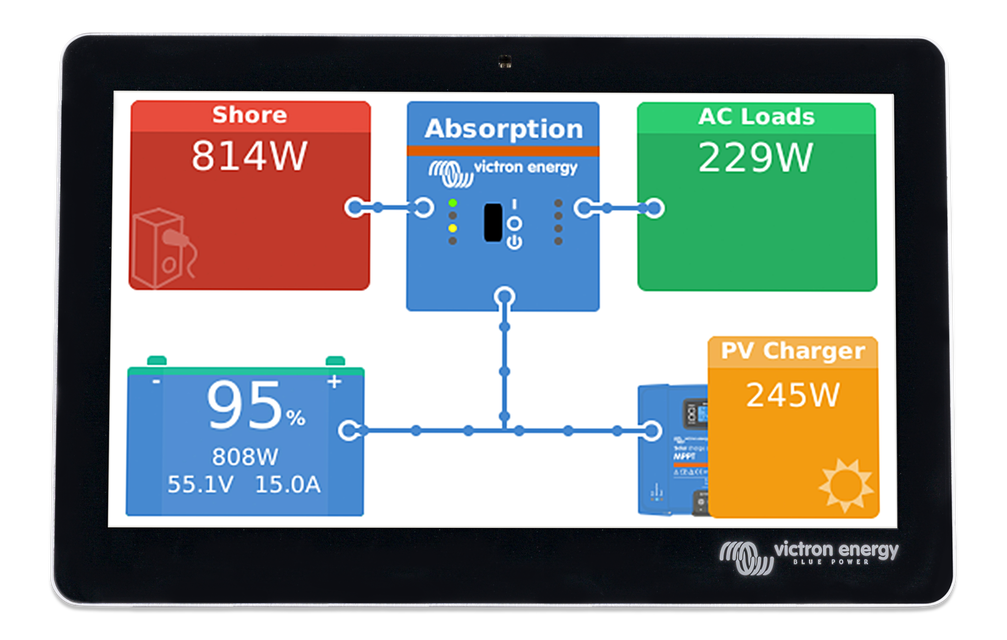
The GX Touch 50 and GX Touch 70 are display accessories for our Cerbo GX. The five inch and seven inch touch screen displays give an instant overview of your system and allow to adjust settings in the blink of an eye. Simply connected to the Cerbo GX with one cable, Their super slim waterproof design, top-mountable setup and simple installation bring a lot of flexibility when creating a crisp and clean dashboard.
www.victronenergy.com
Victron Energy B.V. | De Paal 35 | 1351 JG Almere | The Netherlands
E-mail: [email protected] | www.victronenergy.com
Cerbo GX: communication-centre
This communication-centre allows you to always have perfect control over your system from wherever you are
and to maximise its performance. Simply access your system via our Victron Remote Management (VRM)
portal, or access it directly, using the optional GX Touch screen, a Multi-Functional Display (MFD) or our
VictronConnect app thanks to its Bluetooth capability.
GX Touch: display accessory
The GX Touch 50 and GX Touch 70 are display accessories for the Cerbo GX. The five inch and seven inch
touch screen displays give an instant overview of your system and allows you to adjust settings. Simply
connect the display to the Cerbo GX with just one cable. Both GX Touch displays have a waterproof design, a
top-mountable setup and are simple to install. The supplied (from serial number HQ2242) protection cover
prevents damage from UV light during prolonged exposure to the sun.
Remote Console on VRM
Monitor, control and configure the Cerbo GX remotely, over the internet. Just like if you were standing in front
of the device, using Remote Console. The same functionality is also available on the local network LAN, or
using the WiFi Access Point of the Cerbo GX.
Perfect monitoring & control
Instantly monitor the battery state of charge, power consumption, power harvest from PV, generator, and
mains, or check tank levels and temperature measurements. Easily control the shore power input current limit,
(auto)start/stop generator(s) or change any setting to optimise the system. Follow up on alerts, perform
diagnostic checks and resolve complications remotely.
Simple mounting and configuration
The Cerbo GX is easily mountable and can also be mounted on a DIN-Rail using the DIN35 adapter small, (not
included). Its separate touchscreen can be bolted on a dashboard, eliminating the need to create perfect cut-
outs (like with the Color Control GX). Connection is easy via just one cable, taking away the hassle of having to
bring many wires to the dashboard. The Bluetooth feature enables a quick connection and configuration via
our VictronConnect app.
Victron Energy B.V. | De Paal 35 | 1351 JG Almere | The Netherlands
E-mail: [email protected] | www.victronenergy.com
Cerbo GX: communication-centre
This communication-centre allows you to always have perfect control over your system from wherever you are
and to maximise its performance. Simply access your system via our Victron Remote Management (VRM)
portal, or access it directly, using the optional GX Touch screen, a Multi-Functional Display (MFD) or our
VictronConnect app thanks to its Bluetooth capability.
GX Touch: display accessory
The GX Touch 50 and GX Touch 70 are display accessories for the Cerbo GX. The five inch and seven inch
touch screen displays give an instant overview of your system and allows you to adjust settings. Simply
connect the display to the Cerbo GX with just one cable. Both GX Touch displays have a waterproof design, a
top-mountable setup and are simple to install. The supplied (from serial number HQ2242) protection cover
prevents damage from UV light during prolonged exposure to the sun.
Remote Console on VRM
Monitor, control and configure the Cerbo GX remotely, over the internet. Just like if you were standing in front
of the device, using Remote Console. The same functionality is also available on the local network LAN, or
using the WiFi Access Point of the Cerbo GX.
Perfect monitoring & control
Instantly monitor the battery state of charge, power consumption, power harvest from PV, generator, and
mains, or check tank levels and temperature measurements. Easily control the shore power input current limit,
(auto)start/stop generator(s) or change any setting to optimise the system. Follow up on alerts, perform
diagnostic checks and resolve complications remotely.
Simple mounting and configuration
The Cerbo GX is easily mountable and can also be mounted on a DIN-Rail using the DIN35 adapter small, (not
included). Its separate touchscreen can be bolted on a dashboard, eliminating the need to create perfect cut-
outs (like with the Color Control GX). Connection is easy via just one cable, taking away the hassle of having to
bring many wires to the dashboard. The Bluetooth feature enables a quick connection and configuration via
our VictronConnect app.
Features
Specifications